Your apps and their data, isolated by design.
Deploy an application from GitHub and the databases behind it into a private network of your own, hosted in Jordan. Running in about 75 seconds. Free to start.
The console, as it ships
Every screen below is a capture of a real workspace on the platform. Nothing is mocked.
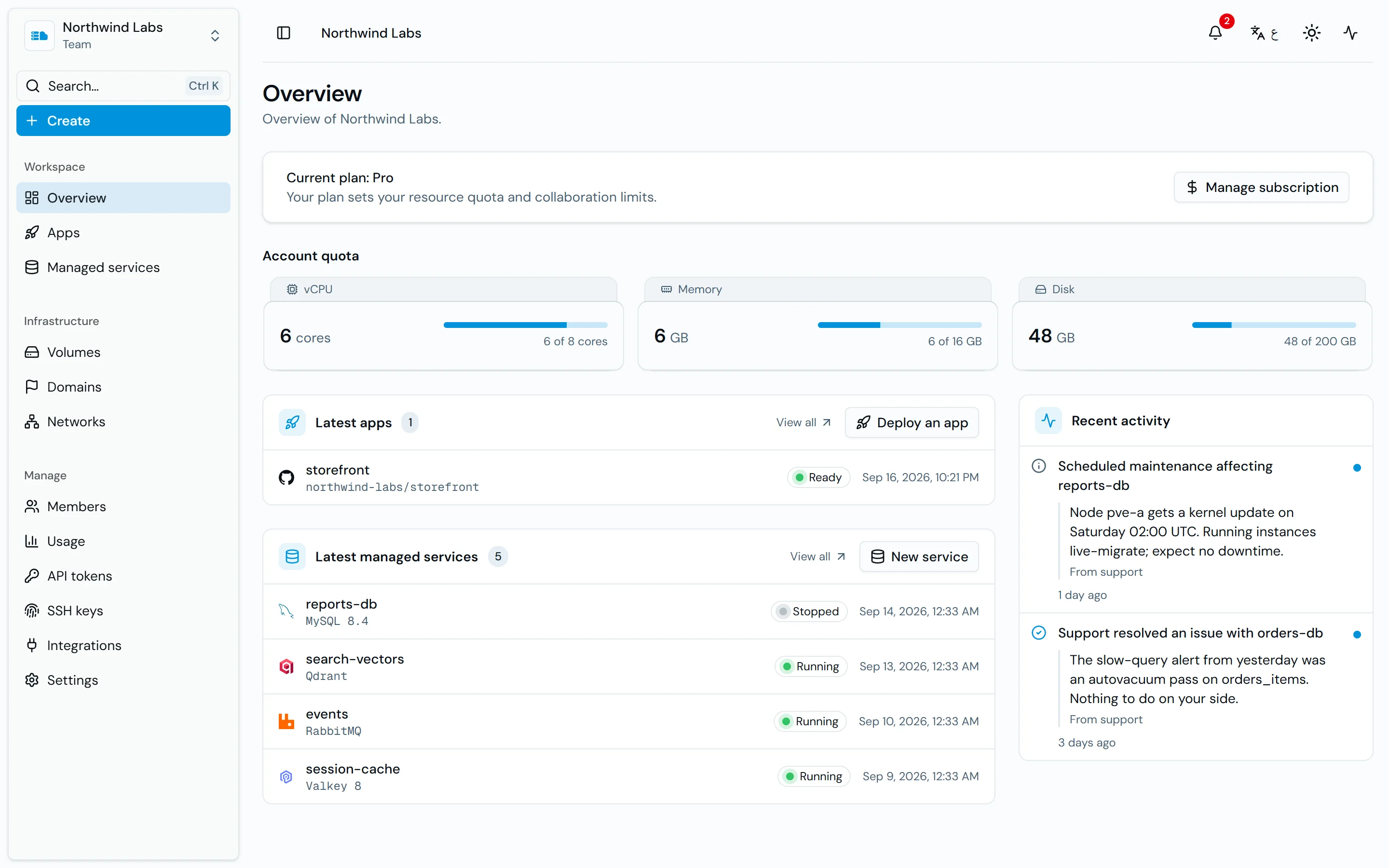
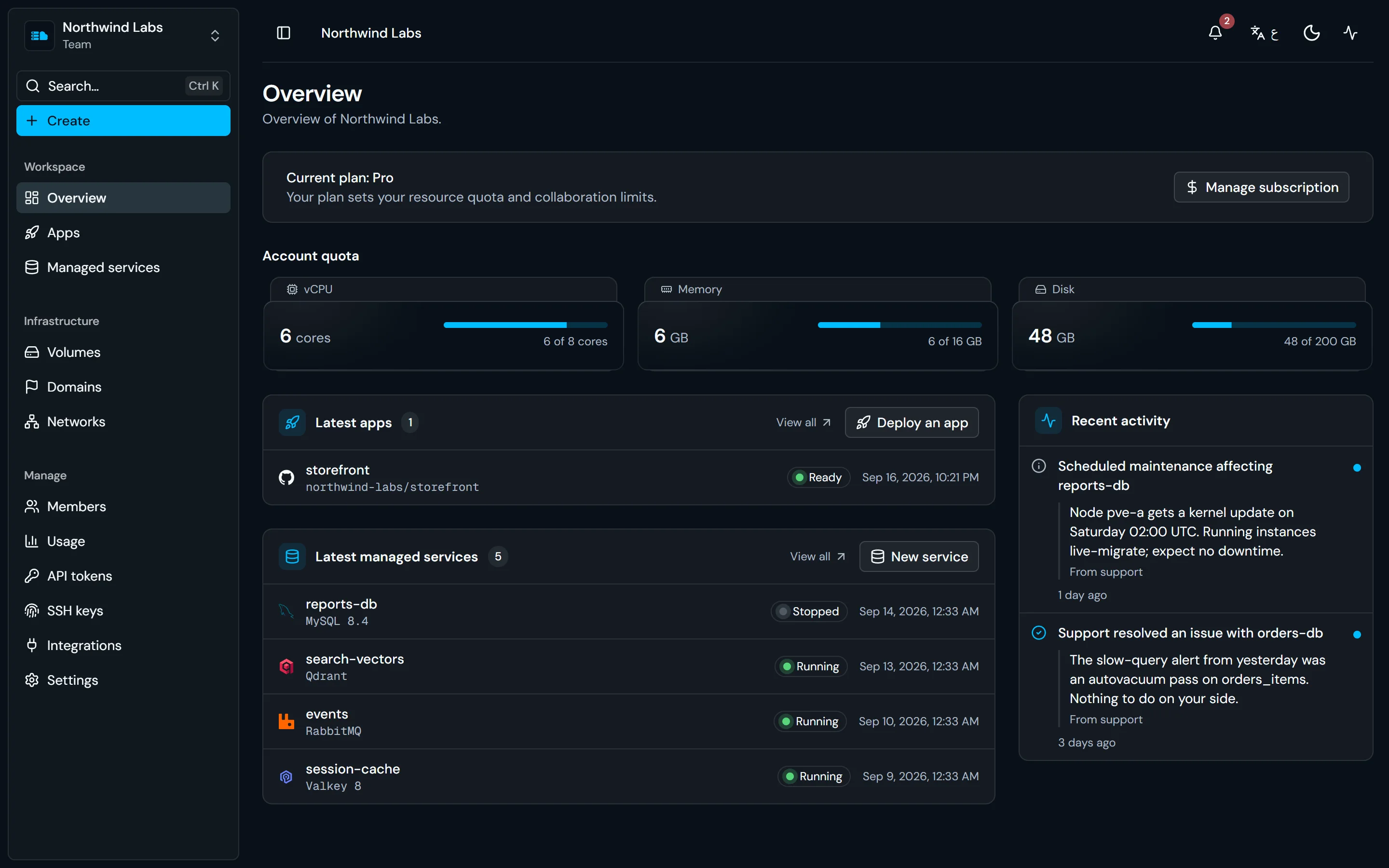
Applications, managed services, quota, and operator notices on one page. Getting started
Create a free accountNo more clicking.
PromptOps (Prompt Operations) is here for you. Turn it on for your workspace, then say what you need in a chat, and it does the work there, one step at a time, while you watch.
Your workspace, your permissions
Off until a workspace's owners or admins turn it on, and then it works only there, as you, with your role. Your other workspaces, your account and billing are out of its reach.
Asks before any change
Looking things up runs right away. Creating, changing and deleting wait for your approval, and your workspace's owners and admins decide what it may do on its own.
English and Arabic
Ask in English or Arabic and get the answer in the same language. In Arabic, the chat reads right to left.
Plans multi-step work
Ask for something that takes several steps, and it plans them, runs them in order and shows you each one as it goes.
- You:
Create a PostgreSQL database called orders-db.
- PromptOps: Check quota usage
There's room for it in your quota. This is what I'll create. Approve it and I'll start.
Create an instanceWaiting for your approval- Engine
- PostgreSQL
- Name
- orders-db
- Access
- Private
Three things you stop maintaining.
Networking, TLS, and tenant isolation are where self-hosting costs time.
Provisioned for you
Networking
A private network per workspace. Every app and instance joins it on creation.
TLS
A public hostname per instance, with TLS on by default. Certificates are issued and renewed by the platform.
Isolation
An unprivileged container per service, on your private network. Tenants cannot reach each other at the network layer.
Maintained by you
Networking
Overlay networks, firewall rules, public endpoints, MTU tuning.
TLS
Certificates and renewals, plus tunnels for encrypted access from outside.
Isolation
A shared host, where a password is the only boundary between tenants.
Built into the platform
The infrastructure around your apps, the tools for your data, and the interfaces for your scripts and agents.
Managed Kubernetes
Clusters inside your private network: we run the control plane and the worker machines, you get a kubeconfig. Node pools, volumes, a gateway, and upgrades in a maintenance window you choose.
Load balancers
One public address in front of your instances and apps. Listeners forward to target groups with health checks, and end TLS with the certificates you import.
Virtual machines
Debian, Ubuntu, or Rocky Linux on your private network. Log in over SSH with your workspace's keys, with passwordless sudo, and install whatever you need.
Query from the dashboard
PostgreSQL and MySQL include a table editor, a SQL editor, and per-application database users. Statements run inside the instance, so private instances need no client or tunnel.
Backups and restores
Take a backup on demand and restore it into a new instance from the dashboard. Every engine also has a public endpoint, so your existing tools work as well.
API, MCP, and teams
Every action is a REST route, with scoped workspace tokens for scripts and CI. An MCP endpoint gives Claude, Cursor, or your own agent the same access, under your role and quota. Invite teammates with roles that define what they can do.
8 engines available today
Choose an engine and a size. About 75 seconds later, an isolated instance is running with its own host, port, and credentials, reachable over the internet.
Managed SQL databases
PostgreSQL 17, MySQL 8.4, and MariaDB 11, each with its own database and a scoped user. PostgreSQL and MySQL start with TLS enabled.
How instances workDocument databases
FerretDB, a MongoDB-compatible document store on PostgreSQL, with TLS and its own credentials.
How instances workCaches and key-value stores
Valkey 8 and Memcached, each on its own port. Valkey with TLS.
How instances workVector databases
Qdrant for embeddings and semantic search, on its own API endpoint over TLS.
How instances workMessage brokers
RabbitMQ with its management interface, ready for queues and publish/subscribe.
How instances work24 more engines in the catalog
ClickHouse, SeaweedFS, Gitea, n8n and others are on the way. Each appears in the dashboard once you can create it, and is announced in the changelog.
ChangelogRunning in Amman, Jordan.
Every app, database, and Kubernetes cluster runs on our own servers in Amman, in the Jordan East region. Saudi Arabia, Qatar, Iraq, and Syria come next.
Your data stays in Amman
Disks, databases, Kubernetes volumes, and backups are stored on our servers in Amman, under Jordan's Personal Data Protection Law No. 24 of 2023.
Public traffic served from Amman
Public endpoints, load balancers, and dedicated IPv4 addresses are served from our own network in Amman.
Spread across separate hosts
Kubernetes workers in a node pool are placed on separate hosts in the jordan-east-1 zone, so a pool doesn't depend on a single machine.
One quota, no per-service bills
A plan gives each workspace you own a pool of vCPU, memory, and disk. Run as many applications and services as fit within it. Start free and upgrade when you need more.
Free
A small database while you evaluate the platform.
- 2 vCPU per workspace
- 2 GB memory
- 20 GB disk
- 1 load balancer per workspace
- Just you, no team members
- Unlimited instances within the quota
Starter
A few always-on services.
- 4 vCPU per workspace
- 8 GB memory
- 80 GB disk
- 2 load balancers per workspace
- Teams and invited members
- Unlimited instances within the quota
Pro
A full stack of databases and applications.
- 8 vCPU per workspace
- 16 GB memory
- 200 GB disk
- 5 load balancers per workspace
- Teams and invited members
- Unlimited instances within the quota
Scale
Production workloads with headroom.
- 16 vCPU per workspace
- 32 GB memory
- 480 GB disk
- 20 load balancers per workspace
- Teams and invited members
- Unlimited instances within the quota
FAQs
Common questions about running services on Sahabti.
Have another question?
Sahabti is free to start. Create an account and launch a first service in minutes; no credit card is required. Paid plans raise the resource quota of every workspace you own.
Read moreStartwithafreeworkspace.
Deploy an application from your repository or launch a managed instance. Free to start; upgrade when you exceed the quota.